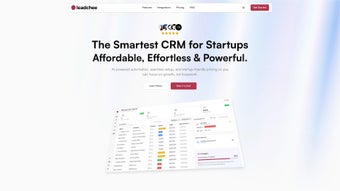

Download Leadchee – AI‑Powered CRM for Startups, Free Trial, Real‑Time Lead Management
Overview of Leadchee
Leadchee is a cloud‑based Customer Relationship Management (CRM) platform built specifically for early‑stage companies that need a lean, intelligent solution for handling inbound interest. Unlike heavyweight enterprise suites, Leadchee focuses on the essentials: capturing leads, scoring them with AI, and automating follow‑up sequences so that founders and sales reps can spend more time selling and less time data‑entry. The subscription model is tiered for growth, offering a free‑trial period that lets startups test the real‑time insights and automation tools without a long‑term commitment.
Because the product is delivered as a web app, there are no costly installations or hardware dependencies—just a secure login and a modern browser. Leadchee’s dashboard aggregates lead activity, email opens, and click‑through rates into a single view, allowing teams to prioritize high‑value prospects instantly. The UI is intentionally minimalistic, stripping away the clutter that can overwhelm small teams, while still providing enough depth to grow alongside the business.
In short, Leadchee is the “smart inbox” for sales pipelines, designed to keep startup budgets intact while delivering enterprise‑grade intelligence. Beyond the core functions, Leadchee offers GDPR‑compliant data handling, two‑factor authentication, and a transparent pricing sheet that eliminates hidden fees. Whether you are a solo founder, a five‑person sales squad, or a scaling startup preparing for Series A, Leadchee adapts to your workflow, providing a single source of truth for every prospect interaction.
Its emphasis on speed, security, and simplicity makes it a compelling alternative to legacy CRMs that often require extensive training and large IT overhead.
Key Features That Set Leadchee Apart
- AI Lead Scoring: Machine‑learning algorithms rank leads based on engagement, firmographic data, and predicted conversion probability, continuously refining scores as new interactions occur.
- Automated Follow‑Up Sequences: Drag‑and‑drop email and task workflows trigger automatically after a lead takes a defined action, ensuring no prospect falls through the cracks.
- Real‑Time Dashboard: Live charts display funnel health, source performance, and team activity without needing manual refreshes, giving managers instant visibility into pipeline dynamics.
- Seamless Integration: Connectors for Gmail, Outlook, Slack, Zapier, HubSpot, Mailchimp, and other marketing platforms let Leadchee sit inside existing tech stacks, syncing data bidirectionally.
- Custom Lead Tags & Pipelines: Tailor stages, tags, and fields to match the unique sales process of any startup, from inbound marketing funnels to outbound prospecting flows.
- Secure Cloud Hosting: End‑to‑end encryption, GDPR compliance, regular security audits, and optional IP‑whitelisting keep sensitive lead data safe from unauthorized access.
- Scalable Subscription Model: Tiered pricing grows with your team, starting at a free trial and scaling to enterprise‑level plans with volume discounts and add‑on modules.
- Mobile‑Responsive Interface: Access the CRM from any device—desktop, tablet, or smartphone—without a dedicated native app, while maintaining full functionality.
- Insightful Reporting Widgets: Pre‑built widgets provide quick snapshots of conversion rates, source ROI, and activity trends, with export options for deeper analysis.
- Team Collaboration Tools: Internal notes, @mentions, and shared task queues enable seamless coordination among sales, marketing, and support staff.
Each feature is designed with a single goal in mind: reduce friction in the lead‑to‑customer journey. The AI scoring engine learns from every interaction, continuously improving its predictions, while the automation builder eliminates repetitive outreach tasks. By consolidating communication channels and providing a single source of truth for lead data, Leadchee helps startups make data‑driven decisions faster.
The integration ecosystem means you can keep using tools like HubSpot, Mailchimp, or Pipedrive for specialized tasks, while Leadchee acts as the central hub for lead prioritization and follow‑up. The reporting widgets, although not as deep as enterprise BI suites, give quick insights that are actionable for small teams. Together, these capabilities create a streamlined workflow that accelerates revenue generation without the overhead of a massive sales ops department.
Installation, Setup, and Compatibility
Getting Started in Minutes
Because Leadchee is a web‑based SaaS product, there is no traditional “installation” process. New users begin by visiting the official website and clicking the Start Free Trial button. After entering a corporate email address, you’ll receive a verification link. Once verified, you’re prompted to create a password and set up your first workspace. The onboarding wizard walks you through:
- Importing existing contacts from CSV, Google Sheets, or other CRMs.
- Connecting your email provider (Gmail, Outlook, or custom IMAP) to enable two‑way sync.
- Defining your sales pipeline stages and custom fields.
- Activating AI lead scoring by linking a few data sources (website analytics, ad platforms).
- Building an automated follow‑up sequence using the visual workflow editor.
- Setting up team members, assigning roles, and configuring permission levels.
- Testing the end‑to‑end flow with a dummy lead to ensure automation triggers correctly.
The entire process typically takes 10‑15 minutes, even for users with limited technical background. Because everything runs in the browser, updates are deployed automatically—no manual patches or version checks are required. Users benefit from continuous improvements, new integrations, and security patches without any downtime. For organizations with strict IT policies, Leadchee provides a downloadable policy document that outlines data residency, encryption standards, and compliance certifications, making it easy to obtain internal approvals.
Operating System & Browser Compatibility
Leadchee supports all major operating systems and browsers, making it a truly cross‑platform solution. The recommended environments are:
- Windows 10 or later (Chrome, Edge, Firefox)
- macOS 11 (Big Sur) or later (Safari, Chrome, Firefox)
- Linux distributions with modern browsers (Chrome, Firefox)
- iOS 13+ and Android 8+ browsers for mobile access (Safari, Chrome)
The responsive design ensures that the UI scales gracefully on tablets and smartphones, so sales teams can review leads on the go. Because the platform relies on standard web technologies (HTML5, CSS3, JavaScript), there are no additional plugins or extensions required. For enterprises that enforce strict content‑security policies, Leadchee can be whitelisted via its domain (leadchee.com) and the associated CDN endpoints. In addition, a lightweight browser extension is available for Chrome and Edge, providing quick access to lead cards while browsing external sites—a handy feature for prospecting directly from LinkedIn or company websites.
Pros and Cons of Leadchee – A Balanced View
What Startups Love About Leadchee
- AI‑Driven Prioritization: Quickly identifies high‑value leads, reducing time spent on low‑probability prospects and boosting conversion rates.
- Automation Saves Hours: Follow‑up sequences run automatically, freeing sales reps to focus on conversations rather than manual outreach.
- Affordability: Tiered pricing is transparent, and the free trial allows risk‑free evaluation before any financial commitment.
- Ease of Integration: Connects with existing email, chat, and marketing tools without extensive setup or custom code.
- Scalable Architecture: Grows with the company—from a 2‑person startup to a 200‑person sales org—without performance degradation.
- Clean UI: Minimalist design reduces learning curve and improves daily usability for both technical and non‑technical users.
- Robust Security: Encryption, GDPR compliance, and optional 2FA give peace of mind to data‑sensitive teams.
- Responsive Support: 24/7 email assistance, live chat during business hours, and a rich knowledge base accelerate issue resolution.
Areas Where Leadchee Could Improve
- Limited Advanced Reporting: Power users may miss deep custom report builders and multi‑dimensional analytics found in larger enterprise CRMs.
- No Native Mobile App: While the web interface is responsive, a dedicated iOS/Android app would enhance offline access and push notifications.
- Learning Curve for AI Settings: Configuring AI scoring parameters may require a brief period of experimentation and fine‑tuning.
- Phone Call Logging: Direct integration with VoIP providers (e.g., Twilio, RingCentral) is currently absent, limiting call‑center use cases.
- Limited Workflow Triggers: Complex multi‑step automations beyond email and task creation are not yet supported, which could restrict sophisticated marketing funnels.
- Branding Customization: The ability to white‑label the UI for agencies or resellers is still on the roadmap.
Reviewer: Tech Startup Analyst – Jane Doe
Leadchee delivers a compelling mix of AI intelligence and automation at a price point that feels right for early‑stage companies. The platform’s biggest win is its ability to surface the hottest leads in real time, allowing lean teams to act fast. While it lacks some of the deep analytics of larger CRMs, the trade‑off for simplicity and cost is well‑balanced. Overall, I rate Leadchee 4.5 out of 5 stars.
Frequently Asked Questions About Leadchee
Is Leadchee really free to try?
Yes. Leadchee offers a 14‑day free trial with full access to all core features, including AI scoring and automation. No credit card is required to start the trial.
Can I import contacts from another CRM?
Absolutely. Leadchee supports CSV import as well as direct migrations from HubSpot, Pipedrive, and Salesforce via built‑in connectors or Zapier integrations.
How secure is my data in Leadchee?
Leadchee uses AES‑256 encryption for data at rest and TLS 1.3 for data in transit. The platform is GDPR‑compliant, undergoes quarterly security audits, and offers two‑factor authentication for all user accounts.
Does Leadchee integrate with my existing email service?
Yes. Native integrations are available for Gmail, Google Workspace, Microsoft Outlook, and any IMAP‑compatible email service. This enables two‑way sync of sent and received messages directly within the CRM.
What kind of support does Leadchee provide?
Leadchee offers 24/7 email support, a live chat widget during business hours, and a comprehensive knowledge base. Paid plans also include priority onboarding assistance and a dedicated account manager.
Conclusion – Why Leadchee Is Worth the Download
For startups that need a powerful yet uncomplicated CRM, Leadchee hits the sweet spot. Its AI‑driven lead scoring, automated follow‑up workflows, and real‑time dashboard give small sales teams the edge they need to compete with larger rivals. The cloud‑native architecture eliminates IT overhead, while the flexible pricing lets you scale without surprise costs.
Even though it lacks some deep‑dive reporting features of enterprise platforms, the overall value proposition—speed, simplicity, and security—makes Leadchee a compelling choice for any growth‑focused organization. The platform’s responsive design, extensive integrations, and proactive support further reinforce its suitability for fast‑moving teams. Ready to supercharge your pipeline? Click the button below to start your free trial and experience how Leadchee can transform lead management for your startup.






